

Facial convexity
How the nose base sits relative to the forehead and chin. Positive is convex; negative is concave.
Construction: Signed bend from G–Sn–Pg (180° minus the inner angle)
Free measurement tool · Beta
See how your forehead, nose, lips and chin relate. Take or upload a side-view photo, review the suggested points, and explore your profile measurements.
01 / CaptureOne adult, true side view. Camera level, lips relaxed, hair clear of the outline.
02 / ReviewReview the suggested outline. Adjust points only where needed.
03 / ExploreSelect a relationship to inspect its lines. Measurements update after review.
Use a plain background with a clear forehead, nose, lips and chin. A three-quarter view cannot give the same measurements.
Or drop a photo here · JPG, PNG, WebP, AVIF · up to 30 MB
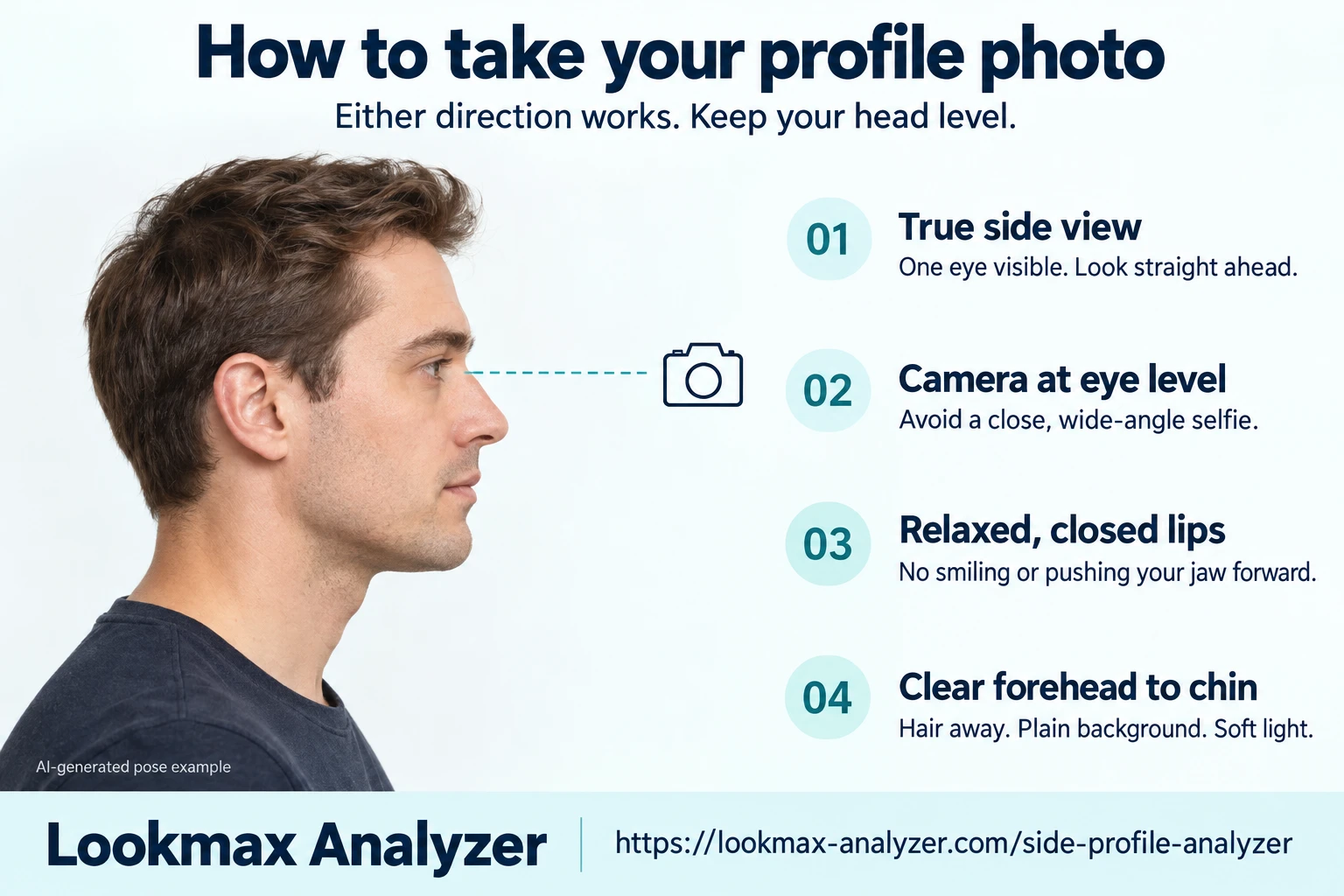
Attribution does not grant reuse rights. Read the image reuse terms.
True side view. Turn fully sideways, with one eye visible. Left and right profiles both work.
Level camera and head. Keep the lens at eye height. Look straight ahead without lifting or lowering your chin.
Relaxed expression. Close your lips naturally. Avoid smiling, speaking or pushing your jaw forward.
Clear outline. Move hair away from your forehead. Keep your nose, lips and whole chin in frame.
Soft light. Use a plain background and even lighting. Avoid filters, deep shadows and a close wide-angle selfie.
Get help with framing.Ask someone to take the photo, or use your phone's timer and upload it. Facial hair can obscure the chin and fold, so check those suggestions carefully.
Complete face report · Front view
Add a front-facing photo to explore your symmetry, proportions and all five feature categories. Your Full Report explains the findings and gives you a personal 4-week plan.
Start your front-facing analysis on the main page, then choose a paid report. Your side-profile measurements stay free and separate.
Measurement background: profile photogrammetry and measurement repeatability. These studies do not validate this tool's automatic landmark suggestions.
Side profile analysis looks at the visible relationship between your forehead, nose, lips and chin in a side-view photo. This tool suggests nine points on that outline and calculates four angles plus lip position relative to the E-line. Face area and left or right direction are detected automatically; you review the points before measurements appear.
Use a true side view with your head level, lips relaxed and forehead through chin visible. Either side works.
Check the nose base, lips and chin closely. Adjust any misplaced point, then confirm the outline.
Select a relationship to see its lines on your photo. You can download the points and measurements as JSON.
Each relationship describes a different part of the outline. These are constructions from visible photo points; other measurement conventions may use different landmarks or tangents and give different values.
How the nose base sits relative to the forehead and chin. Positive is convex; negative is concave.
Construction: Signed bend from G–Sn–Pg (180° minus the inner angle)
The transition at the nose root. This three-point construction approximates the visible bridge direction.
Construction: G–N–Prn
The angle between the underside of the nose and upper lip. Check the columella point closely.
Construction: Cm–Sn–Ls
The fold between the lower lip and chin. This tool uses chin prominence (Pg), not the bottom of the chin.
Construction: Li–Sli–Pg
Negative means behind the nose-tip-to-chin line; positive means ahead. Shown as % of nose length, not millimetres.
Construction: Perpendicular lip distance to Prn–Pg ÷ N–Prn length
Read the angles in degrees and E-line lip offsets as a percentage of nose length. Negative lip offsets mean behind the line; positive offsets mean ahead of it. The tool does not convert pixels to millimetres or assign a side-profile attractiveness rating.
Head tilt, camera distance, facial hair and point placement can change the result. For repeat photos, keep the pose, framing and lighting consistent. An unavailable relationship needs a closer point check; it does not mean that a feature is good or bad. These measurements cannot determine bone position or diagnose a recessed jaw or bite.
It measures facial convexity, the forehead–nose angle, nose–lip angle, lip–chin angle, and upper and lower lip position relative to the nose-tip-to-chin E-line. Angles are in degrees; lip distances are expressed as a percentage of nose length, not millimetres.
Choose or take a photo, then select Analyze profile to send a resized copy for automatic detection of the face area and nose direction. Review the suggested outline, then confirm to see measurements. Open Adjust points to correct misplaced landmarks or flip the detected direction. Manual placement is available without uploading the photo.
Take a photo with the camera button or upload an existing photo. Use one clearly visible adult in a true side view, with a level head, relaxed closed lips and a clear forehead, nose, lips and chin. Keep the camera at eye level; ask someone to help or use your phone’s timer. A plain background and soft light help. Hair, facial hair, shadows, perspective and three-quarter views can obscure the outline or change the measurements.
This is a beta measurement tool. A facial landmark network guides the visible outline, but the resulting points have not been anatomically validated. The tool repeats extraction on a mirrored photo and withholds unclear or unstable relationships. Check every point before confirming, especially the nose base, lips and chin. Results describe photo geometry; they do not diagnose bone position or a bite, or calculate an attractiveness score.
It gives photo measurements, not an attractiveness rating or an ideal-profile score. Facial convexity, angles and lip position describe different relationships; they do not establish how attractive someone is. The paid face report uses a separate front-facing analysis.
This tool does not set a golden-ratio target or label a profile as good or bad. It reports the geometry of the points you review on one photo. Different point definitions, camera perspective and head position can change the readings, so matching a single number is not the goal.
Yes. Explore our paid face reports for a category breakdown, facial ratio insights and personalized grooming and styling priorities. A report starts with a separate front-facing photo analysis. Your free side-profile measurements remain available here; they are not automatically included in the paid report.
This tool is free and requires no account. Choosing a photo opens a local preview. Analyze profile and Suggest points send a resized copy to our server for processing in memory; we do not save the photo or use it for training. Manual placement and measurement calculations stay in your browser. Clearing the photo removes the local preview. The measurement JSON download includes points and numbers but no photo, filename or image URL.