

Vertical balance
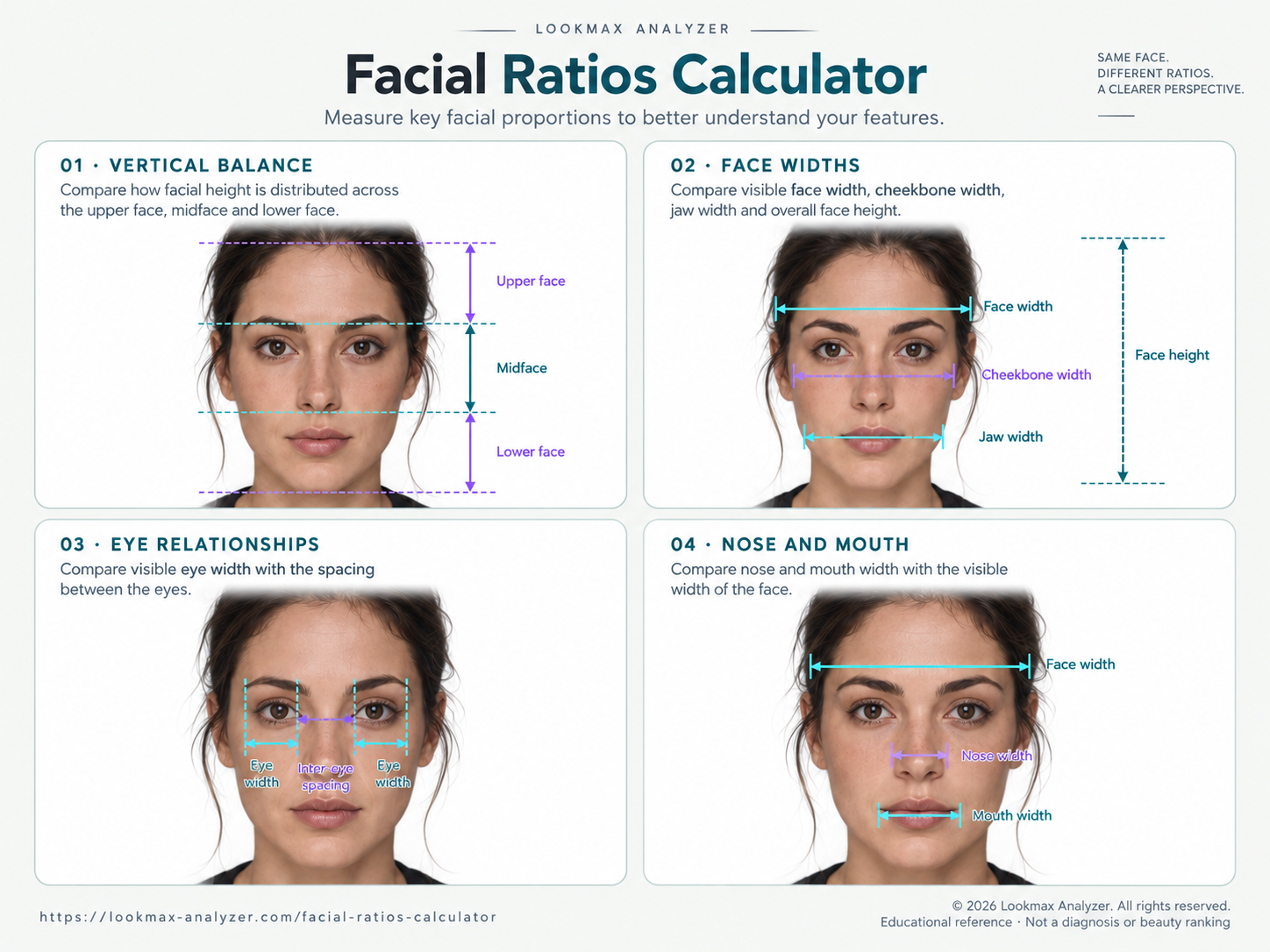
Compares how visible face height is distributed across the upper face, midface, and lower face. Hairline visibility and head pitch can affect the photographed balance.
Measure 12 facial relationships from one front-facing photo. Select any result to see where it was measured and how it compares with the matching reference band.
Includes one of your two free specialized tool results. Previously revealed tools remain available on this browser.
Keep your hairline, eyes, nose, mouth, jaw, and chin visible so the calculator can map all 12 measurements.
Get 2 specialized tool results free. Your revealed results stay available in this browser.
Drag and drop your photo here
or choose a file below
JPG, PNG, WebP or HEIC · Up to 30 MB
Best results: face forward, level head, relaxed mouth, hairline visible.
Private: core analysis stays on your device. Your photo is shared only if you separately opt in to an eligible AI photo feature.

Example framing only, not a target look.
For the best results:
Results are based on detected facial landmarks and the selected comparison profile.
Need more details? See FAQ
The calculator detects facial landmarks in your browser, aligns the face, and computes 12 dimensionless relationships across vertical balance, face widths, the eyes, nose, and mouth.
Each result uses the same measurement definitions and contextual references as the complete report. Select a measurement to see the relationship on your photo and understand what it describes.
Align
Use a level, front-facing photo with a relaxed expression.
Measure
Landmark distances are converted into scale-independent ratios.
Explore
Select any result to see its guide, meaning, and comparison band.
Every number describes a relationship between detected facial regions. Each guide explains what the measurement describes, how the comparison band is selected, and which photo conditions can affect it.
Attribution does not grant reuse rights. Read the image reuse terms.
Compares how visible face height is distributed across the upper face, midface, and lower face. Hairline visibility and head pitch can affect the photographed balance.
Compares the visible face, cheekbone, and jaw regions with one another and with face height. Head turn, hair, and lens distance can change the outline.
Compares visible eye width with the spacing between the eyes. A level, front-facing photo helps keep both sides comparable.
Compares visible nose and mouth widths with nearby facial regions. Expression and close-camera perspective can move these photo-based estimates.
Conceptual guide only. These are photo-based relationships, not diagnoses, population percentiles, or attractiveness grades.
Vertical balance
Forehead-region height compared with the full visible face.
A covered or uncertain hairline can make this estimate unavailable.
Vertical balance
Central-face height compared with the full visible face.
Head pitch and uncertain hairline evidence can affect the reading.
Vertical balance
Lower-face height compared with the full visible face.
An open mouth or raised chin can change the photographed relationship.
Vertical balance
The visible height of the midface compared with the lower face.
Calculators using pupil or lip anchors produce a different number.
Face widths
Visible facial width compared with upper-face height.
Published fWHR methods use more than one vertical definition.
Face widths
The width of the jaw region compared with the cheekbone region.
Hair, head turn, and lens distance can alter the visible outline.
Eyes
Spacing between the eyes compared with visible facial width.
Head turn can compress one side of the face in a two-dimensional photo.
Eyes
Visible eye width compared with the spacing between the eyes.
Squinting, glasses, and eyelid occlusion reduce reliability.
Nose and mouth
Visible nose width compared with the cheekbone region.
Close wide-angle selfies can exaggerate central facial features.
Nose and mouth
Visible nose width compared with the gap between the inner eye corners.
Use a level photo with both inner eye corners clearly visible.
Nose and mouth
Visible nose width compared with mouth width.
Smiling, pursing, or pressing the lips changes the photographed width.
Nose and mouth
Visible mouth width compared with the cheekbone region.
A relaxed, closed-mouth expression provides the most repeatable result.
Midface height
compared with
Lower-face height
Some online tools use a pupil-based convention. That is a different measurement, so its number should not be compared with this calculator's profile-matched band.
Visible face width
compared with
Upper-face height
Published and online fWHR methods use different vertical definitions. Compare this result only with the band displayed beside it, rather than with values produced by a different method.
| Photo factor | Possible effect | Better setup |
|---|---|---|
| Head turn | Compresses one side and changes visible widths. | Face the camera directly. |
| Camera distance | Close lenses exaggerate central features. | Step back and use modest zoom. |
| Expression | Smiling changes mouth and lower-face landmarks. | Keep lips and jaw relaxed. |
| Hairline coverage | Makes facial thirds uncertain. | Move hair away from the forehead. |
For repeat comparisons, keep the same camera, distance, lighting, and expression. See the face-photo guide.
“Within,” “slightly above,” and “slightly below” describe placement against the site's current reference for the selected measurement.
A value outside a band is a geometric difference, not a defect. The calculator does not create a separate golden-ratio or attractiveness score.
Want to focus on vertical balance? Use the Facial Thirds Calculator for three percentages and an adjustable hairline guide. Curious about φ? The Golden Ratio Face Calculator compares one face-height measurement with 1.618 and explains its limits.
Core landmark and ratio calculation runs in your browser. Model assets may download, and your current analysis may be retained locally so the page can restore it.
These are two-dimensional photo estimates, not millimetre measurements, diagnoses, or population percentiles.
These sources explain landmark detection, anthropometric variation, and why a photo-based ratio should be treated as descriptive geometry rather than a universal standard.
Facial ratios compare two detected distances, such as nose width with mouth width or cheekbone width with upper-face height. They describe geometry in one photo rather than your value or identity.
This calculator compares the detected vertical height of the midface with the lower face. Other sites may use pupil spacing or lip-based conventions, so similarly named results are not always comparable.
No. The displayed bands are Lookmax Analyzer comparison references for these exact landmark definitions. They are not universal anatomy, population percentiles, or treatment thresholds.
Calculators can use different landmarks, photo alignment, pose correction, and reference bands. Camera distance, head position, expression, and hair coverage can also change a two-dimensional estimate.
No. Your selected gender and goal can change contextual comparison bands, but the measured geometry from the photo stays the same.
The direct midface ratio can still be measured. Hairline-dependent thirds are marked estimated or unavailable instead of receiving a confident shorter-or-longer verdict.
Core facial landmark and ratio calculation runs in your browser. The app may download model assets and can retain your current analysis locally so it can restore the result. Separate paid or styling services have their own disclosures.
When eligible, the calculator reveals all available launch measurements as one of your two free specialized tool results. Previously revealed tools remain available on the same browser.
The calculator measurements, comparison bands and interactive overlays stay free when eligible. The optional Full and Advanced reports add the five-category breakdown, strengths and main limiter, ranked recommendations, a personalized four-week plan and a downloadable PDF. Review the available plans and pricing before purchase.